Start your free 3-day trial — no credit card required, full access included

Left pancreatic resection, spleen-preserving, robotically assisted

Reading time readingtime 34:50 min.
Activate now
  1. Setup

    Setup

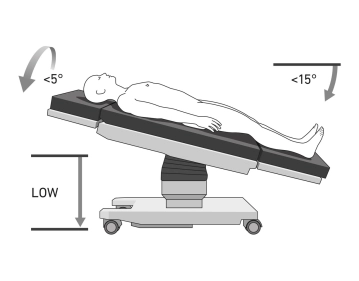
    Positioning is done in the supine position on the large vacuum cushion. The left arm can be positioned separately. The use of the cushion eliminates the need for additional supports.

    Note:

    The positioning is of particular importance due to the docking of the patient to the robot's manipulator. There is a risk of injury if the patient slips.

    Caution:

    Vacuum cushions may have leaks. Check again before sterile draping.

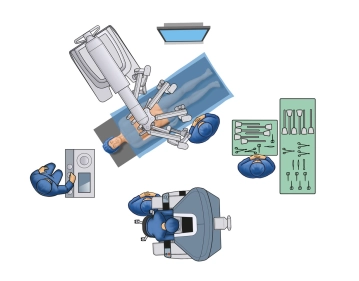
    • The surgeon ideally sits at the console with the ability to also view the patient and table assistant.
    • The surgical robot (Patient Card) is brought to the patient from the left side.
    • The table assistant stands or sits on the right side of the operating table.
    • Anesthesia is positioned at the head of the patient.
    • The scrub nurse stands to the right of the table assistant.
  2. Creation of Pneumoperitoneum and Trocar Positioning

    Video
    504-Trokare-2 beide  Systeme.jpg
    Soundsettings

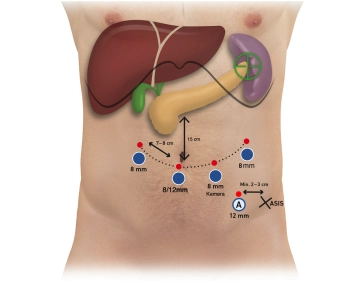
    Creation of a pneumoperitoneum using a Veress needle at Palmer's Point in the left upper abdomen. Due to the varying abdominal wall compliance, it is advisable to determine the optimal position of the trocars on the inflated abdomen with pneumoperitoneum. The robotic trocars are positioned on a line slightly curved cranially on the sides (smiley) 15 cm below the anticipated lower edge of the pancreas (usually below the navel).

    Here, three 8 mm trocars and one 12 mm trocar are initially used with a reducer sleeve if robotic stapling is intended.

    Note: A robotic 12 mm trocar is necessary for the robotic linear stapler. If stapling is to be done using the Endo-GIA through the assistant trocar, four robotic 8 mm trocars can also be used.

    The trocars are inserted symmetrically with a distance of approximately 8 cm from each other. In the left lower abdomen, a 12 mm assistant trocar is inserted between trocar 3 and 4 about 3-4 cm caudal to the aforementioned trocar line.

    Tip:

    Strict attention should be paid to maintaining the 8 cm (hand width) distance between the Da Vinci trocars to avoid collisions of the robotic arms. Additionally, a 2-3 cm distance from the anterior superior iliac spine is important.

  3. Positioning, Docking, and Instrument Allocation

    Video
    Positioning, Docking, and Instrument Allocation
    Soundsettings

    After inserting the trocars, the operating table is tilted to approximately 15° anti-Trendelenburg and approximately 5° right lateral position. The surgical robot is brought in and the robotic arms are docked. The patient cart is positioned slightly to the left over the patient's head. The arms are connected (docked) with the robotic trocars. Initially, the targeting maneuver is performed. Subsequently, the instruments are introduced under visual control and parked under the ventral abdominal wall. Instrument placement from right to left (from the patient's perspective) Trocar 1: Cardiere Grasping Forceps, Trocar 2: Bipolar Forceps, Trocar 3: Camera, Trocar 4: Vessel Sealer/Scissors/Stapler, Assistant Trocar: Atraumatic Grasping Forceps, Suction

    Caution:

    The trocars must be positioned with the wide black ring (remote center) at the level of the muscular abdominal wall (so-called remote control) to minimize shear forces in the abdominal wall during movement.

    Note:

    Ideally, the robotic trocars are inspected with the camera through the assistant trocar when introducing the robotic instruments. This allows the position of all robotic trocars to be easily checked again before the start of the operation.

Checklist until switching to the console

Incision in the left upper abdomen, insertion of the Veress needlePneumoperitoneumMarking line and

Activate now and continue learning straight away.

Single Access

Activation of this course for 3 days.

US$9.40  inclusive VAT

Most popular offer

webop - Savings Flex

Combine our learning modules flexibly and save up to 50%.

from US$4.35 / module

US$52.30/ yearly payment

price overview

robotics

Unlock all courses in this module.

US$8.71 / month

US$104.60 / yearly payment

to top